How to configure Fujitsu Scansnap scanner with ImageRamp
Integrating ImageRamp with Fujitsu Scanners
You can easily configure ImageRamp Batch and ImageRamp PDF Composer to work directly with Fujitsu's hugely popular ScanSnap scanners. ImageRamp is configured for use with the Fujitsu ScanSnap Manager, the scanner's main interface, with no additional user actions required. Shortcut buttons let users save their settings and destinations for easy selection right from the touch screen. After installation and setup, ImageRamp is now available to use with the ScanSnap Manager.
For ImageRamp Batch users, ScanSnap is configured to scan to a specific folder at the touch of a button. Once files are scanned to the folder, ImageRamp Batch can automatically process (or watch) the files for those profiles configured for watched folders or processed on user demand according to the selected profile's setting.
With ImageRamp PDF Composer use ScanSnap scanners with the touch of a button. After installation and setup, ScanSnap Manager automatically launches the scanned document into ImageRamp PDF Composer.
Setting up ScanSnap Profiles
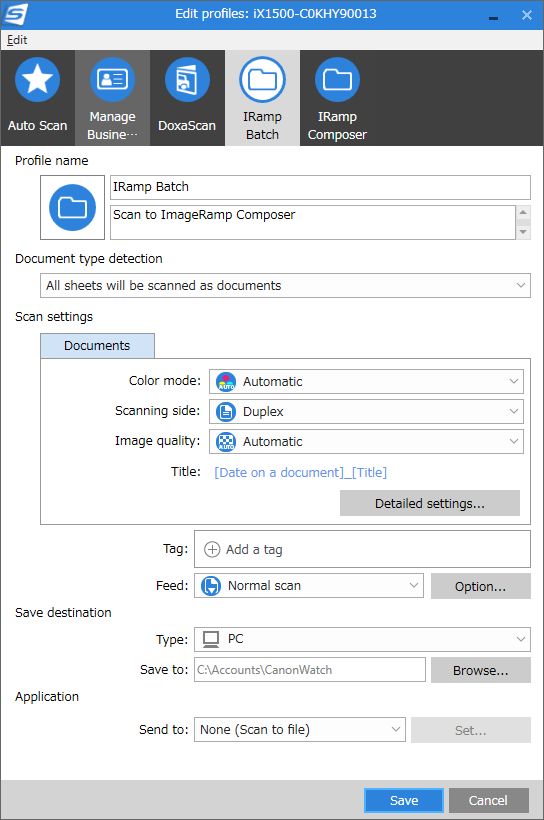
Use the Edit button located in the ScanSnap Home page, located in the upper right corner to configure a new or existing button. This will display the more detailed page for the actions to take with this button
Configure the document destination path along with other key parameters such as format, duplex/simplex, resolution, and other settings.
. 
Learn more at our main site Docufi.com